OwnHour.
Your attention. Your time.
OwnHour blocks the apps and sites that pull you away, holds your limits when willpower dips, and hands the hour back to you. Calm by design — no streaks, no shaming, no guesswork.
Free trial for new customers · free tier stays free
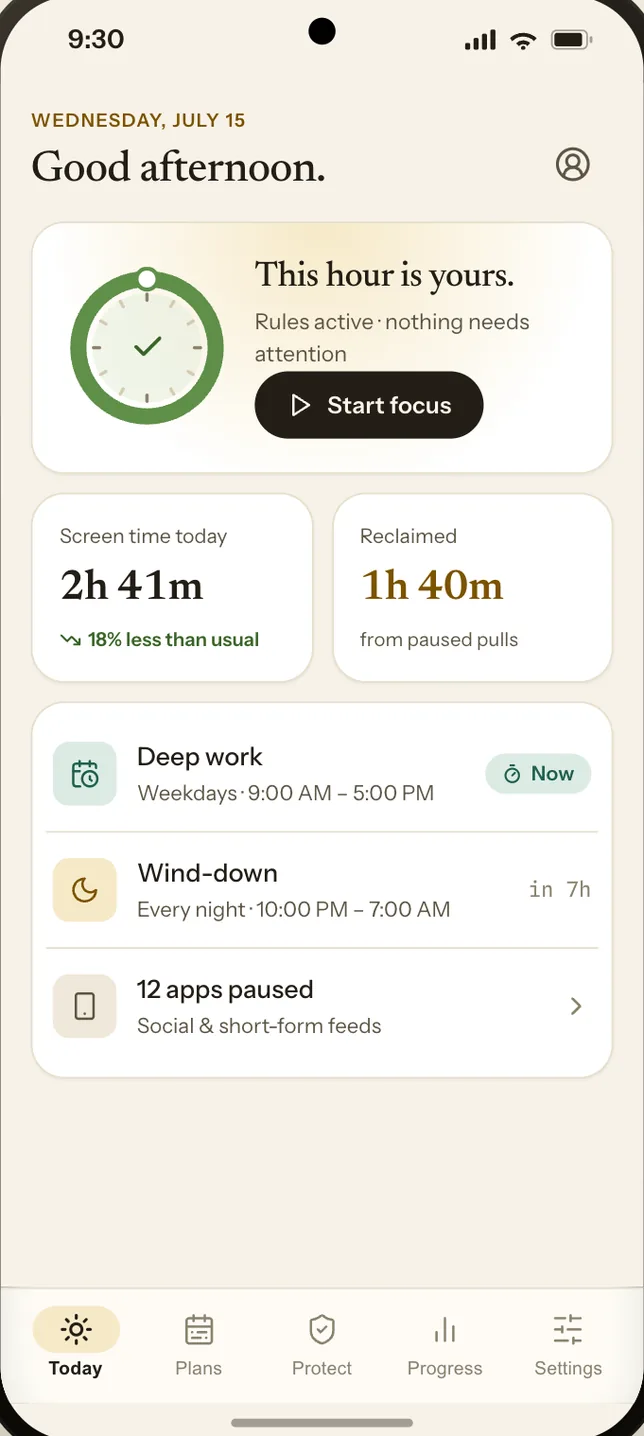
Three ways to hold the line you drew.
Set it once on a clear-headed morning. It keeps working at 11pm, when the pull is strongest.
Block what pulls
Apps, sites, whole domains, single keywords and adult content. YouTube Safe Search stays on, whether or not anyone is watching.
Limits and schedules
Give an app twenty minutes a day. Close the feeds after ten. Keep mornings clear until you’ve had coffee.
Focus sessions
Gentle when you want a nudge you can step past. Strict when you mean it — the session ends when the clock says so.
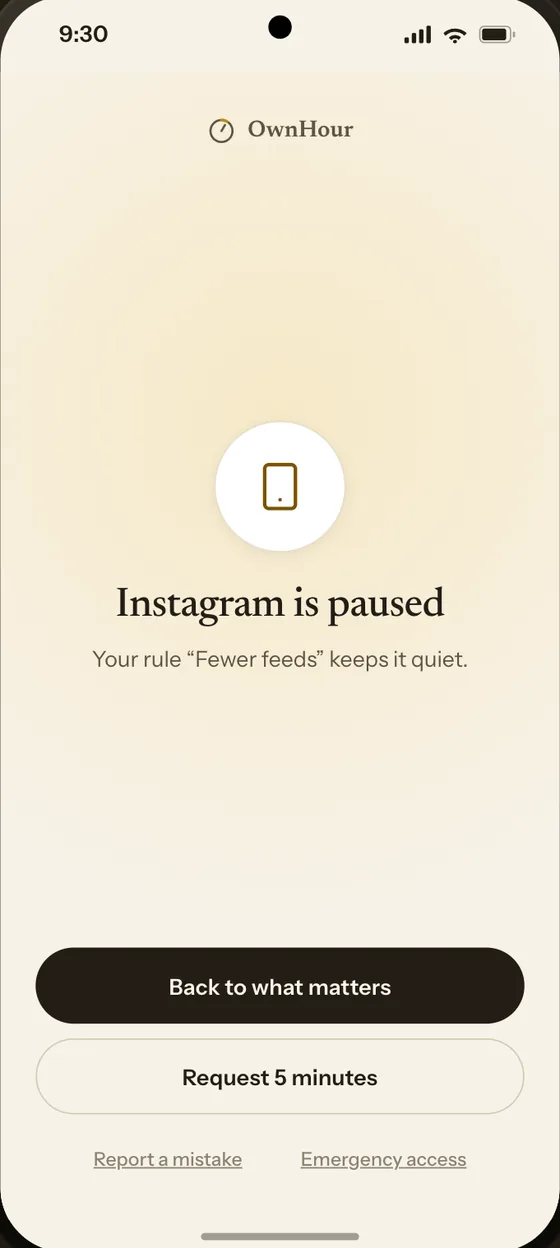
No shame. Just the reason, and a way forward.
Every blocked moment tells you three things: what happened, whose rule it was, and what you can do next. It’s your rule doing the work — so the screen speaks plainly instead of scolding.
Choose how hard it is to undo your own rule.
Turning protection off is the moment that matters. Pick the guard that fits how much help you want — from a typed phrase to a person who has to say yes.
Self challenge
Type a strict phrase, word for word, before anything changes. Enough friction to break autopilot.
Time delay
The change waits. If you still want it when the delay ends, it’s yours — most urges don’t last that long.
Friend or partner
Someone you trust approves protected changes. They see the request — not your browsing.
Parent
Family mode keeps the rules with the parent, on the child’s device, with clear limits and no surveillance.
A 15-minute safety override is always available, on every guard, so nothing can lock you out of a phone you may need.
This stays on your phone.
A blocker sees the most private thing you own. So OwnHour is built to know as little as possible — and to keep none of it.
One price. Every guard.
Start free. Pro adds every guard, every limit and the people who help you keep them — with a free trial first.
For a first, honest look at where the hours go.
- Block apps, sites and keywords
- Adult-content filtering and YouTube Safe Search
- One schedule · Gentle focus sessions
- Self challenge guard
- Seven days of local insights
Works out to $3.33 a month — two months free.
- Unlimited schedules and limits
- Extra filter categories — gambling, social feeds
- Time delay and partner approval
- Family mode, Guardian protection and Strict sessions
- Full history of hours reclaimed
Pay once, keep Pro. For people done with subscriptions.
- Everything in Pro, permanently
- All future features on this device
- No renewal to forget
Partners never pay. Inviting someone to hold a rule with you is free for them, always.
Free trials are for new customers only. Google Play shows your exact price, trial length and renewal terms before you confirm. Prices shown in USD; local Play pricing applies.
Questions people ask first.
Which phones does it run on?
Android only today, built natively so blocking holds up under pressure. There’s no iOS release yet and no date to promise.
Can’t I just turn it off?
That’s the point of guards: you decide in advance how hard it should be. With a time delay or partner approval, the version of you at 11pm can’t quietly undo the version of you that set the rule.
What does my accountability partner see?
Only the requests you route to them — “unblock Instagram”, “end the session early” — and whether they approved. No browsing history, no app list, no location.
How do I know protection is actually working?
Protection health reads the real state of every permission it needs. If Android stops the accessibility service or a permission is revoked, you see it plainly, with a two-minute fix — never a green tick that lies.
Do you sell any of my data?
No. There’s no ad business here and no data to sell — the app is paid for by the people who use it, which is why Pro exists.
Take the next hour back.
Set one rule tonight. See what the morning feels like.